SE-2811 Software Component Design
Lab 2: Creating Strategies with Factory Methods
The objective of this lab is to refactor the Angry Bees simulation such that
both the Game and GameCharacter classes encapsulates behaviors the
Strategy Pattern, and incorporate the Factory Method pattern into the
Bee and Flower classes to create those characters.
Assignment
Download the TagBehavior.java and
MoveBehavior.java files containing the
interfaces that define the MoveBehavior and TagBehavior strategies.
Since these are just interfaces, you'll have to provide the implementation of
the concrete strategies in concrete classes. You will need to create 4 classes
that implement the MoveBehavior interface; these are
- RandomMoveBehavior - as demonstrated in lecture, this class
implements the random move planning behavior originally implemented in the
Bee class.
- StationaryMoveBehavior - this is a "null" behavior that Flowers use.
- GreedyMoveBehavior - this is the behavior which causes the character
using this behavior to move to the Flower with the highest number of points.
- SmartMoveBehavior - this is the behavior which causes the character
to move to the closest Flower with at least 3 points.
You will need to implement 2 classes that implement the TagBehavior
interface; these are:
- StandardTagBehavior - this is the behavior originally implemented
in the Game class.
- AdvancedTagBehavior - this is a new behavior that should
implement an algorithm similar to StandardTagBehavior, but also:
- when a Bee tags another Bee, this game should "steal" half the
points from the tagged Bee and award them to the tagging Bee 20% of the
time (use a random number generator to do this efficiently), and do
nothing the other 80% of the time.
- when a Bee tags a Flower whose name is "nightshade", 50% of the time
the game should change the behavior of the tagging Bee so that it
subsequently uses RandomMoveBehavior and award the Bee 0 points
(although the Flower's score should decrease to 1 point as usual). The
other 50% of the time, no behavior change should be made, but the Bee
should still be awarded 0 points along with the Flower's score reducing
to 1 point.
- when a Bee tags a Flower whose name is "daisy", the game should
award points as usual, but also change the behavior of the tagging Bee
so that it subsequently uses SmartMoveBehavior.
- when a Bee tags a Flower whose name is "rose", award points as usual
and change the behavior of the tagging Bee so that it subsequently uses
GreedyMoveBehavior.
The class diagram representing this application's structure after the is as follows (the
different colors serve only to differentiate strategy interfaces from
strategy implementations):
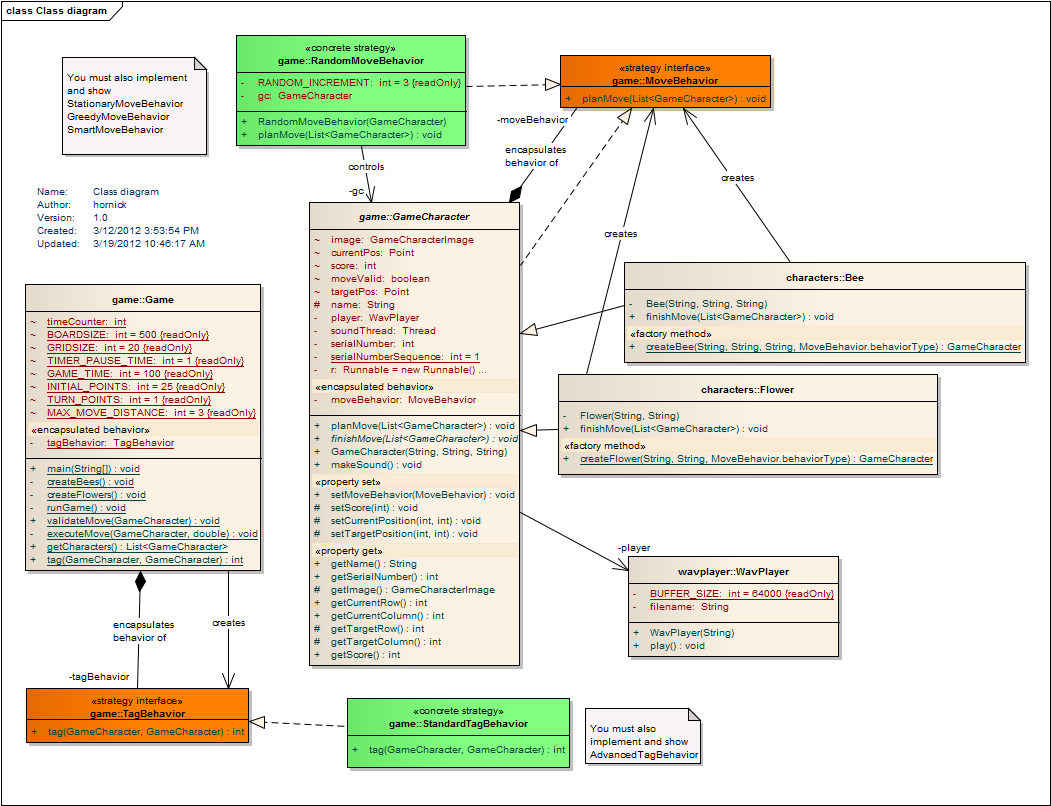
To create Bees in this version of the game, note that you must modify the
Bee class to implement a Factory Method named createBee(),
which handles the creation of the Bee itself as well as a specified behavior
(supplied to createBee() as an enum). Similarly, to create Flowers, you
must modify the Flower class to implement a createFlower() Factory
Method.
In the Game class, you must modify Game to implement the TagBehavior
interface, create an instance of StandardTagBehavior in the main()
method, and set the tagBehavior attribute to initially reference
that instance. The Game.tag() method thus initially uses
StandardTagBehavior whenever that method is called from a GameCharacter's
finishMove() method. You must modify the Game class's runGame()
method to switch to use AdvancedTagBehavior when
the remaining time is 80% of the original game time. No special Factory Method
is needed to create or switch these behaviors.
Lab Submission (due 8:00am Monday
3/19/2012 via SVN)
Your assignment will consist of:
- your completed implementation, containing your fully-commented,
functional classes.
- a reverse-engineered UML class diagram, similar to the one shown above,
but including the additional concrete Strategy classes indicated. Be sure
to create ALL associations (similar to those shown), as well as the
<<stereotypes>> as appropriate. Also, add a Diagram Note as
shown above - your name and date will be automatically incorporated into the
note. Create a .pdf file
containing the class diagram by using the File/Print command and printing to
a PDF printer driver (e.g. CutePDF Writer).
Submit your assignment by committing your projects entire source folder to your SVN
repository in a top-level project named "Lab2" (no trunk, branches, or
tag is needed). The .pdf image file should be directly in the Lab2 folder, but all code should be in a
subfolder of Lab2 named "src". Do not commit any binary files (such as
.class files), and do not commit the EA
project file.